IN for 2026: Cybersecurity | OUT: USB Storage Devices
By Ginny Clemenko
May 19, 2026 UPDATE: See the latest schedule for USB storage blocking implementation below under Timeline, along with additional FAQ updates.
At UVA Health, protecting our data — be it patient, research, or operational data — is everyone’s responsibility. To strengthen our cyberdefenses, UVA Health will begin blocking the use of USB storage devices (e.g., “thumb” drives and other external storage drives) on all UVA Health-issued personal computers (PCs) across the University Medical Center, UVA Community Health, UPG, School of Medicine, School of Nursing, and the Claude Moore Health Sciences Library. Implementation will occur in phases starting in March.
“Ransomware attacks on healthcare organizations are rising, and USB storage devices are a common access point for bad actors,” said Chris Baker, Chief Information Security Officer, UVA Health. “Blocking USB storage devices is a cybersecurity best practice across industries that handle sensitive data, including healthcare, government, tech, and finance. This work is a key component of our health system-wide IT security strategy.”
What to Expect
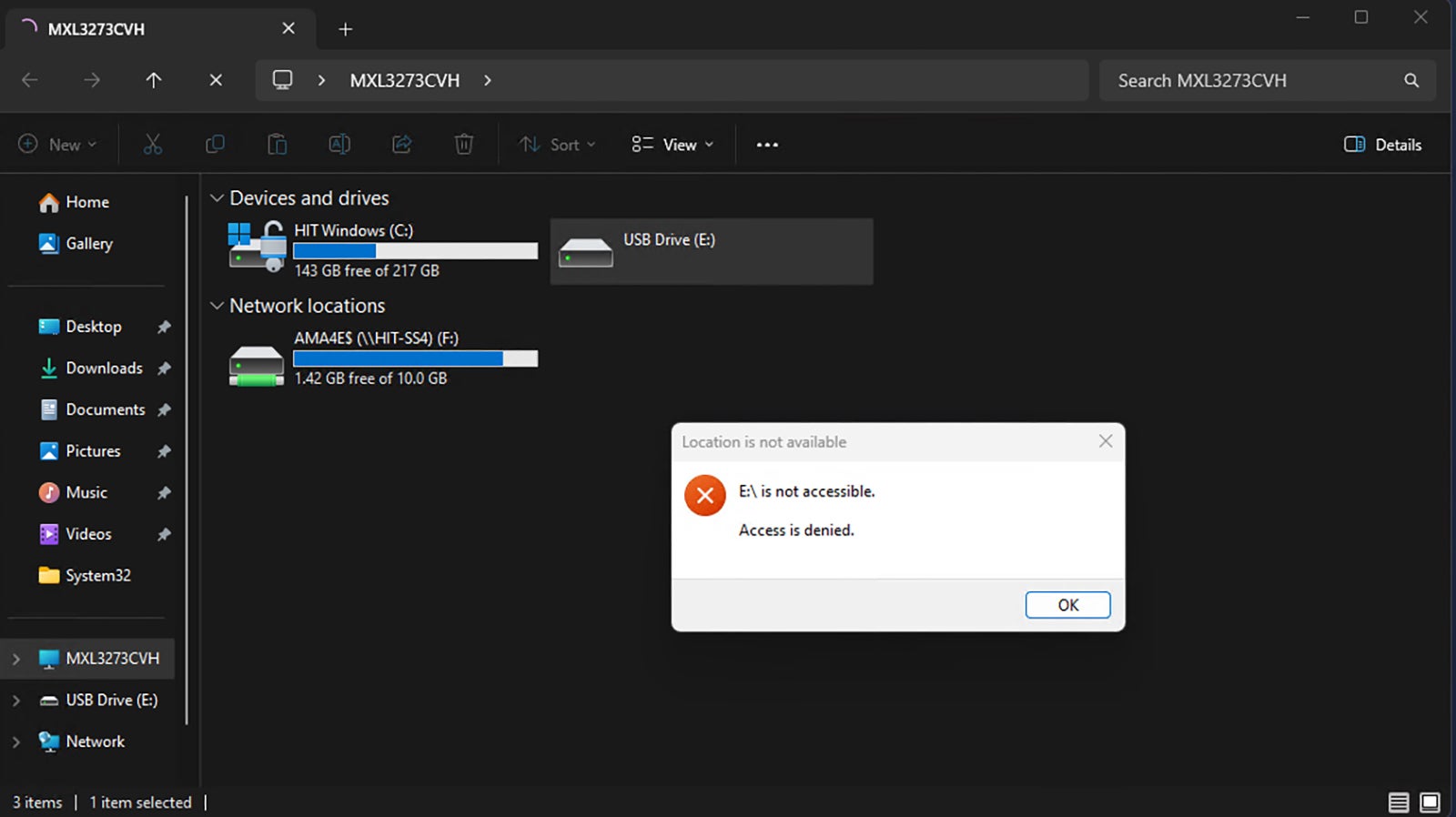
Once USB blocking is implemented on your UVA Health-issued PC, if you try to connect an external drive you will receive a pop-up message telling you that access to the device is denied.
As an alternative to USB drives, HIT is encouraging all team members to use their OneDrive cloud storage account. All team members are automatically allocated 10GB of storage and more may be requested through ServiceNow. If you are not familiar with or are not using OneDrive, learn more on HIT’s Knowledge Base site.
This change does not affect USB-connected mice, keyboards, phone chargers, or similar accessories. Note that phones may be charged by plugging it in to a PC, but access to the data on them will be blocked.
While patient medical records collection has evolved significantly with One Team | United on Access, there will still be occasions when patients arrive with records on USB devices, whether at ambulatory clinics or inpatient/emergent patient transfers. The HIT team is working with clinical leaders to finalize workarounds for these cases and recommendations will be shared prior to go live in impacted areas.
Clinical Equipment and Other Special Use Cases
Information Security has been working closely with Clinical Engineering, other HIT teams, and clinical leaders to identify all medical equipment that requires the use of USB devices to transfer data and develop bespoke solutions for these devices. If your department has medical equipment that uses USB devices for data transfer and you are unsure if it has been accounted for in this process, please escalate to your manager, who may contact the HIT ServiceDesk to connect with the appropriate support team.
Timeline
The blocking initiative began with a pilot in inpatient room PCs across all four UVA Health hospitals on Jan. 27. USB devices are used rarely — if ever — on inpatient room PCs, but these machines represent a key risk given their public access. From there, blocking will be rolled out in waves starting in April. Order of implementation is based on impact, with the least impacted areas going first and high-impact areas (e.g., radiology, cardiology, etc.) last. HIT is prioritizing a successful implementation with minimal disruption to operations, so an end date has not been established at this time. See below for the current implementation timeline. HIT will conduct targeted email outreach to the leaders of impacted areas ahead of implementation.
USB Blocking Initiative Implementation Timeline
*”Back Office” devices are PCs used for administrative or non-clerical work, such as email, scheduling, billing, or general office tasks. These devices are typically located in offices or work areas that are not used for patient care.
Read the FAQs below to learn more and watch for updates and reminders about the go-live in your area.
USB Blocking Initiative Frequently Asked Questions
Scope
What USB devices are blocked? Which are still allowed?
Blocked: all external storage devices (e.g., “thumb” drives, external hard drives, etc.)
Allowed: USB-connected mice, keyboards, phone chargers, or similar accessories. Note that phones may be charged by plugging in to a PC, but access to the data on them will be blocked.
Which health system entities are included in this initiative?
All health system entities: School of Medicine, School of Nursing, UVA Community Health, Claude Moore Health Sciences Library, UPG, University Medical Center.
How do I know if I have a UVA Health-issued PC?
Your PC will have a sticker with a UVA Health HIT serial number and service desk phone number.
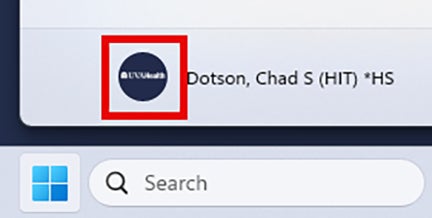
When you click on the start menu, all UVA Health-issued PCs display a small, dark blue circle with the UVA Health logo in the lower left corner:
Are academic-issued PCs impacted?
If you have an academic-issued PC, it will not be impacted by this USB blocking initiative.
Impact
When will I/my team/my department be impacted?
USB blocking will be rolled out in waves starting in April. Order of implementation is based on impact, with the least impacted areas going first and high-impact areas (e.g., radiology, cardiology, etc.) last. HIT is prioritizing a successful implementation with minimal disruption to operations, so an end date has not been established at this time. Waves and impacted areas will be announced here on Connect and in health system newsletters, with targeted email outreach by HIT to the leaders of these areas in advance of each go live. See the current implementation schedule above.
If you have questions about the project timeline or when your area may be scheduled for implementation, please contact the HIT Service Desk.
How can I tell if USB storage devices are blocked on my PC?
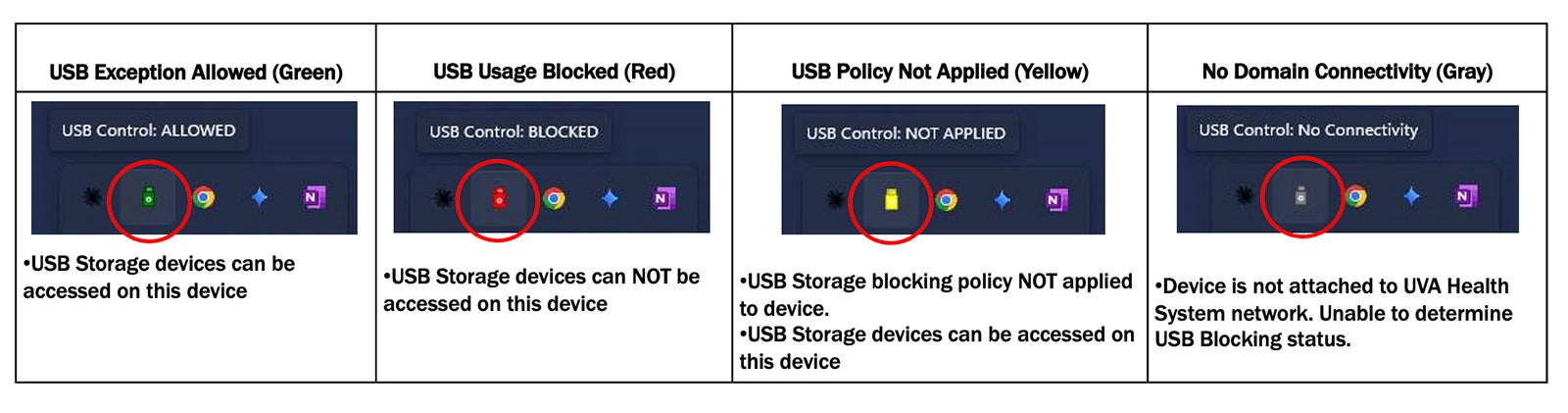
Starting May 18, HIT is deploying a tray icon utility that will display the current USB storage status of your device. The icon color and status message will change depending on whether USB storage devices are currently accessible or blocked. See example visuals:
(Click to enlarge.)
What should I do if a patient brings their medical records on a USB device?
The HIT team is working with clinical leaders in both inpatient and ambulatory care settings to finalize workarounds for these cases and recommendations will be shared before prior to implementation in affected areas.
What is the process to apply for an exception to this policy?
If you wish to apply for an exception to the USB blocking policy, please apply through ServiceNow.
What happens if I accidentally connect a USB storage device?
You will see a pop-up window indicating that the device may not be accessed. If you see this pop-up, disconnect the USB device.
OneDrive Cloud Storage
What is OneDrive?
Microsoft OneDrive is a cloud-based storage platform and the primary cloud storage solution available at UVA Health. It is pre-installed on all UVA Health computers and provides 10GB of storage space, ten times the capacity of the traditional F: Drive. By using OneDrive, you can securely access, sync, and share your files from your PC, web browser, or work phone. To ensure your data is backed up and automatically available whenever you switch computers, it is a best practice to always save documents to your OneDrive folder rather than local locations like "Desktop" or "Documents."
To learn about the many benefits of OneDrive, how to use it, and best practices for use, visit the HIT Knowledge Base site.
How do I check my OneDrive storage capacity and request additional capacity?
To learn how to check your current capacity, visit the HIT Knowledge Base site.
While discouraged, OneDrive is secure and approved for the storage of PHI. It is an industry and UVA Health best practice to store as little PHI as possible (ideally, none).
How can I share files with partners and vendors outside of UVA Health?
At this time, OneDrive will not allow for sharing outside of UVA Health. For now, the best way to share files with a trusted external partner is Dropbox.
However, Dropbox will eventually be retired and HIT will provide a new solution, which may be OneDrive.
Contact
I am worried about data transfer from a piece of clinical equipment- whom should I contact?
Different teams service different equipment, depending on the type (e.g., Clinical Engineering, HIT, dedicated IT teams for Pharmacy, Lab, Radiology, etc.).
If you are concerned that medical equipment that uses USB devices for data transfer in your department has not been accounted for, please escalate to your manager, who may contact the HIT ServiceDesk to connect with the appropriate support team.
I am a researcher concerned about the impact USB blocking will have on my ability to share data with colleagues and collaborators — whom should I contact?
Please escalate to your manager, who may in turn contact the IT leaders for the School of Medicine and School of Nursing as needed.
Thanks for your question! This initiative applies to all UVA Health-issued PCs. If your PC was issued by UVA Health, it will have a sticker with a UVA Health HIT serial number and service desk phone number. When you click on the start menu, all UVA Health-issued PCs display a small, dark blue circle with the UVA Health logo in the lower left corner. If you have any further questions, please feel free to contact the HIT Service Desk.




Does this apply to research office computers?
Thanks for your question! This initiative applies to all UVA Health-issued PCs. If your PC was issued by UVA Health, it will have a sticker with a UVA Health HIT serial number and service desk phone number. When you click on the start menu, all UVA Health-issued PCs display a small, dark blue circle with the UVA Health logo in the lower left corner. If you have any further questions, please feel free to contact the HIT Service Desk.