10.5.2026
Achieving Exceptional Outcomes: UVA Health University Medical Center Honors FY26 Q4 Patient Experience Award Recipients
On Tuesday, July 14, all UVA Health team members will transition from the current Duo Push to Duo Verified Push for access to most services, including Microsoft 365. Logging into Epic Mobile Apps and Electronic Prescribing of Controlled Substances will not be affected.
What is Duo Verified Push?
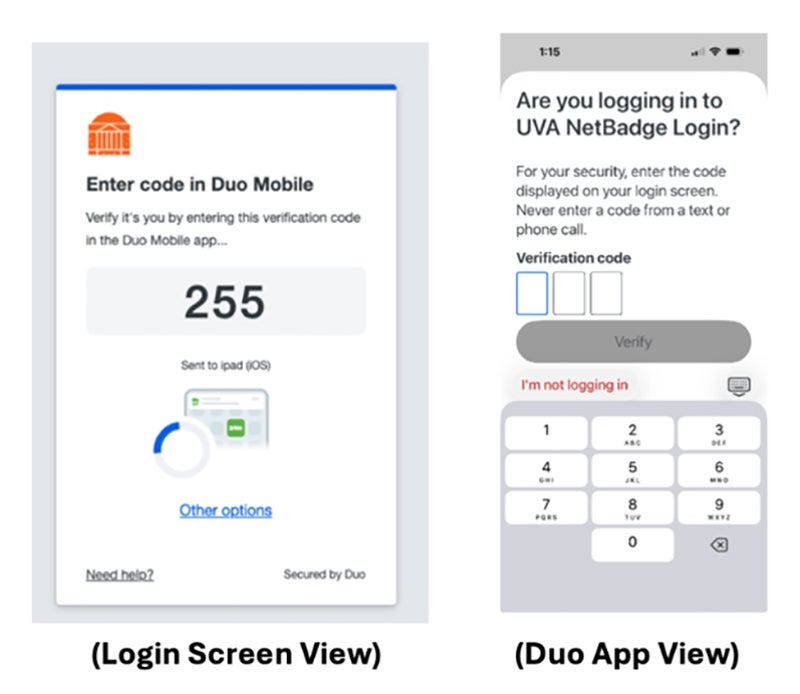
Instead of tapping "Yes" to approve a login, with Duo Verified Push you will be asked to enter a three-digit code shown on the login screen into the Duo app, as shown below. No action will be required by users and devices with the current Duo app – these devices are automatically ready for the change.
Why are we changing?
The switch to Duo Verified Push aims to reduce the number of incidents in which a user receives a push notification and approves it reflexively, without pausing to confirm why it was triggered. This additional step adds an important layer of protection by helping ensure that you are approving a login that you initiated, not someone else.
If you receive a Duo prompt that you did not initiate, please deny it and report it to HIT via Service Now.
How should I prepare for this change?
1. Review the FAQs below.
2. Visit the How to Use Duo page from ITS.
3. Contact the Health Information and Technology Service Desk at 434.924.5334 with questions.
Thank you for doing your part to protect UVA Health information and systems, and the patients and team members they serve.
Do UVA Health Team members need to install anything or take any action in advance of the transition to Duo Verified Push?
No advance action is needed for most UVA Health Team members. Moving from Duo Push to Verified Push does not require any special updates.
Does Duo Verified Push require a Duo Mobile update?
If your Duo app is current, no action is needed. Devices should be on Duo Mobile version 4.85 or above. If you have an older version, you may be prompted to update when you next authenticate.
Can I still use my smart watch to approve a login?
Yes. Instead of tapping “Yes” to approve a login, you will need to type the three-digit code into your smartwatch.
What if the code expires before I can enter it?
Like Duo Push, Verified Push requests generally expire after 60 seconds. If the request expires, return to the application you are trying to access and log in again to generate a new push notification and code.
How does Duo Verified Push help protect our systems from cybersecurity attacks? Is this extra step really necessary?
Cybersecurity incidents are on the rise, up 21% in the health sector and 55% across all sectors from 2024 to 2025, according to Health-ISAC, a healthcare industry cybersecurity non-profit. In this landscape where threats are increasing, Duo Verified Push provides an additional layer of protection against multi-factor authentication (MFA) fatigue that is a tactic used in many attacks, including social engineering and real-time phishing attempts to harvest your password. If an attacker is trying to access your credentials, they may send a wave of repeated push notifications and users reflexively accept them, letting the attacker gain access to the system. Verified Push requires an additional step, and a code from your device, that the attacker cannot see.